Viewing and Editing SCADA Properties in FMS Explorer
Each Node in CygNet Measurement is associated with specified SCADA devices and facilities. Details about this information are contained in the corresponding SCADA device or facility property pages, that can be accessed indirectly via the Node property pages, or can be accessed directly via several menu shortcuts in FMS Explorer.
The SCADA polling device, polling facility, or reporting facility properties associated with a selected Node can be accessed from Node Chooser controls within FMS Explorer. SCADA polling device properties can also be accessed from additional locations.
|
Viewing and Editing SCADA Properties |
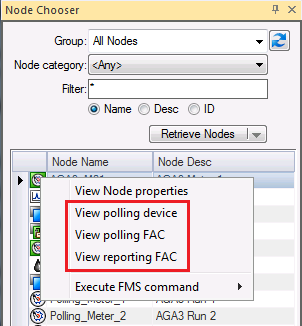
To view SCADA details for a device or facility associated with a Node, right-click on an existing Node name to access the context menu and then click one of the following options.
Note: This feature is currently available only in 32-bit versions of the software.
- View polling device - See Viewing and Editing SCADA Polling Device Properties for more information.
- View polling FAC - See Viewing and Editing SCADA Polling Facility Properties for more information.
- View reporting FAC - See Viewing and Editing SCADA Reporting Facility Properties for more information.
SCADA properties can also be accessed from CygNet Explorer. See Viewing and Editing SCADA Properties in CygNet Measurement for more information.
Viewing SCADA Properties
The following SCADA properties are applicable for each Node type.
|
|
Gas Meter Device Node - polling device, polling FAC |
|

|
Station Meter Node - polling device, polling FAC, reporting FAC | |
|
|
Chromatograph Device Node - polling device, polling FAC |
|
|
|
Liquid Device Node - polling device, polling FAC |
|
|
|
Accessory Node - N/A |
|

|
General Group Node - N/A |
|

|
Station Group Node - reporting FAC |


The Properties dialog box displayed contains the properties specific to the device or facility that is associated with the selected Node.
Editing SCADA Properties
You can edit the device or facility Properties in the dialog box that is displayed, if you have proper security authorization.
See Remote Device Editors for more detailed information about SCADA device properties.
See Viewing Facility Attributes for more detailed information about SCADA facility properties.
More:
 Viewing and Editing SCADA Polling Device Properties
Viewing and Editing SCADA Polling Facility Properties
Viewing and Editing SCADA Reporting Facility Properties


